Recover accidentally deleted files
Few people know that even after deleting the file permanently or from recicle bin it's possible to recover it.
This is not a simple task however it is possible, the file characteristics and the computer activity since the file was deleted can influence the speed and efficiency of the lost file.
It's also possible (and harder) to recover files from a formated hard drive if fast formating was used.
After realizing the disappearance of the file, the first step is to suspend all tasks on the computer. This prevents new files take the place of that disappeared.
When you delete a file on your hard drive, this is not destroyed, instead, the space is marked as free to be written by other files but the data remain intact. So, if you stop the activities on the computer the chances of recovering the file increases, because it is preventing another file occupies the space left free.
So the only way to delete files permanently to be impossible to get them back is to do a full format. A quick format does not completely erase the disc, just mark the whole hard drive as free and deletes partition tables.
First, the good news - you can resurrect the deleted file. Now get ready for the hard work.
Many programs offer specialized demo copies that only indicate if it's possible to recover the file, but do not recover it, or just allow to recover very small files. Therefore, the only solution is to purchase one of these programs.
Remember, to increase the possibility of recovering the file you should not install anything on your computer, not even software that will recover your files.
Typically, these programs work in two ways: a separate version to run from a portable device (pen USB or CD) and an installed version that allows you to create the portable version.
If the program needs to be installed, you must install it on another computer and then create the portable version which will recover the file.
As examples, you can try these programs
Recover4all
An example of a program that has a format to run on portable device is the Recover4all. Download it, too (should be) in another computer other than the one that contains the file to be retrieved and run the file. This will generate a floppy with the utility, ready to be used on the PC where the file is lost.
The Recover4all displays a window similar to Windows Explorer, with one difference, in this view is only listed folders that containing deleted files.
The files are listed with the possibilities of recovery: perfect, good, medium, fair.
Select the file or files, and click the "Recover" on the toolbar.
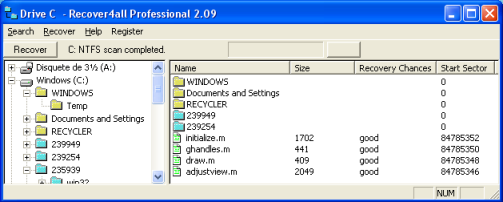
To avoid overwriting files the program asks you to select another drive to put the recovered files.
The list of the deleted files are built in two steps, after the first scan you can start viewing deleted folders. The higher the hard disk longer will be the full disk scan
You see, it is not easy to recover a deleted file. It is only when convenient to solve this problem already taken preventive measures.
Recuva
Recuva is a similar software that allows to recover deleted files.
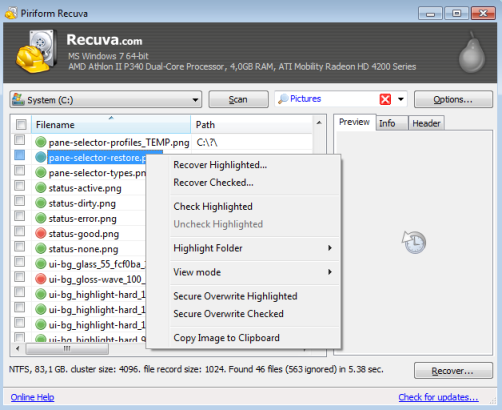
A list of some features
- Undelete files on your computer (internal or external devices)
- Recovery from damaged or formatted disks
- Recover deleted emails
- Restore unsaved Word documents
- Deep Scan
- Securely delete files you want to erase forever
- Portable version
- Full Windows OS support and many languages